

Automatic Handling of Payments When an Event is Cancelled
On the occasion of an event being cancelled that already has associated line items and/or payments, the Calendar & Excursions feature will now automatically handle the reversal of finance transactions in the following manner.
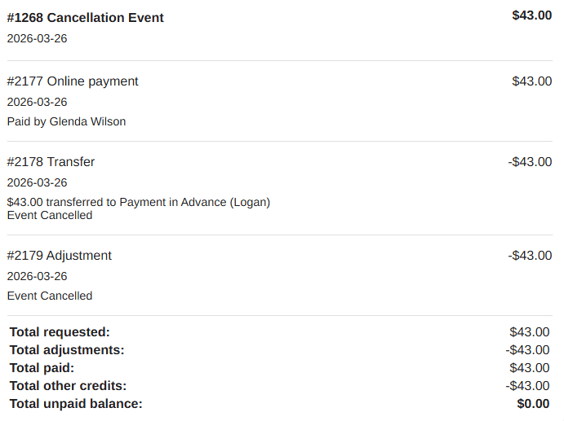
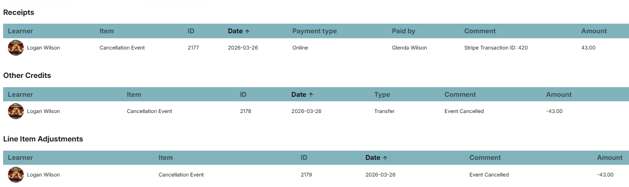
- Line Items attached to the event are identified and any payments made will be automatically transferred to Payment in Advance. Note: refunds will not be processed.
- All line items will have their value adjusted to zero.
- Line items will still be visible to the caregivers and finance officers, showing the adjustments made.
Caregiver view:
Staff view:
Note: Deleting an event will not affect financial transactions. To ensure the correct process is used, an event cannot be deleted when Open to Caregivers or Closed to Caregivers. Utilise Delete to remove draft events prior to opening or events that have been previously cancelled.
Define Your Own Student Permissions
Student Permissions are fields that are included as part of the standard student information, that you may wish to include in an event e.g. EOTC Trip Permission, Permission to act in the event of injury. You would only add these to the event if the caregiver was able to change the option for the purposes of that event.
These permissions are not always located on the Permissions tab, so we have added a way for the Calendar & Excursion feature to recognise a standard student field as a Student Permission.
To flag a field for potential inclusion in an event, go to Manage Fields and click EDIT on the desired field. Click to tick ‘This is a Student Permission’ and save the field.
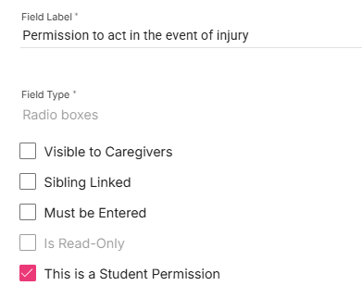
This will make it available for selection when creating an event.
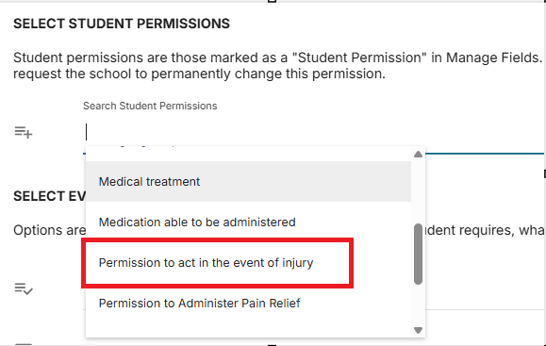
A student permission is not restricted to a Yes/No radio button so, going forward, may be used to update permission information at the beginning of the year. More information on how to utilise this option will be provided once a bulk update process has been developed.
To assist with the setup, Hero has preset the ‘Is a Student Permission’ flag on the following standard fields. (Note: these may be named differently in your school).
- Internet Usage
- Publication of Student Images & Works
- EOTC Trip Permission
- Permission to Act in the Event of Injury
- Permission to Administer Pain Relief


